16
DNS Over HTTPS Explained: How Encrypted DNS Works
Learn what DNS over HTTPS (DoH) is, how encrypted DNS queries work, how DoH compares with traditional DNS and DNS over TLS, and how to configure it for better DNS privacy.
Every time your device needs to find a website by its domain name, it may need to send a DNS query. Traditional DNS queries are often sent without transport encryption, which can allow network operators or other parties along the network path to observe the requested domain names.
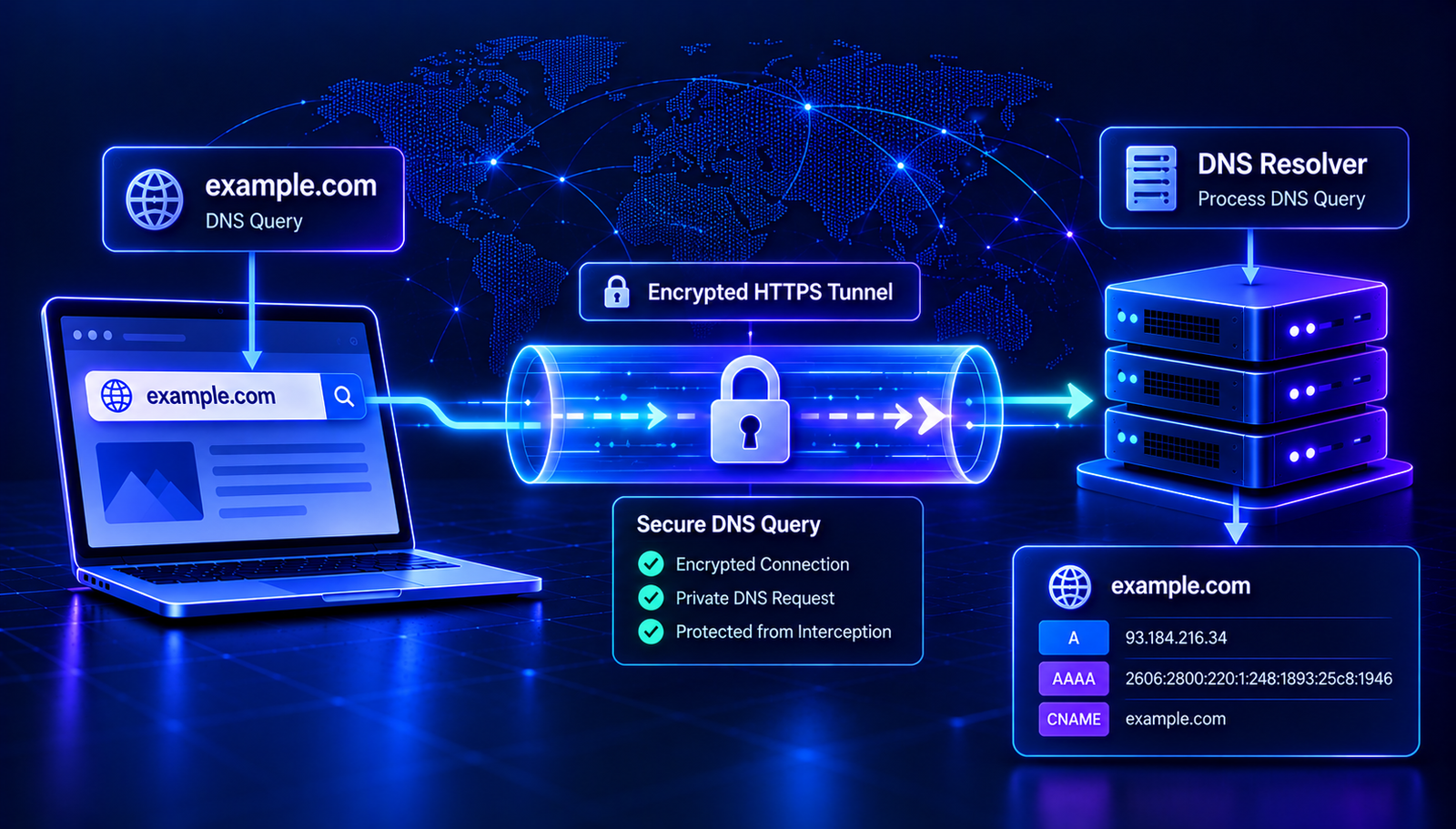
DNS over HTTPS, commonly called DoH, addresses this issue by sending DNS queries through an encrypted HTTPS connection. It helps protect DNS traffic while it travels between your device and the selected DNS resolver.
In this guide, you will learn what DNS over HTTPS is, how it works, how it compares with other DNS technologies, and what to consider before enabling it.
What Is DNS Over HTTPS?
DNS over HTTPS (DoH) is a protocol that sends DNS queries and responses over HTTPS. HTTPS uses Transport Layer Security (TLS) to encrypt data exchanged between a client and a server.
Ordinary DNS commonly uses port 53 over UDP or TCP. DoH instead carries DNS messages over an HTTPS connection, typically using port 443. This allows DNS requests to use the same general transport security used by many websites.
The goal is to reduce the ability of network observers to read or tamper with DNS messages while those messages travel between the client and its chosen resolver.
DoH does not replace the Domain Name System. It changes how DNS messages are transported between a client and a resolver.
How Does DNS Over HTTPS Work?
Imagine that you enter a domain name into your browser. Your device needs to discover the information required to connect to the relevant service.
- A DNS query is created. The browser or operating system needs information about the requested hostname.
- The query is sent to a DoH resolver. The client sends the DNS message using an HTTPS connection.
- The connection encrypts the exchange. TLS helps protect the query and response from being read or modified by parties observing the connection in transit.
- The resolver processes the query. It obtains the relevant DNS answer through its cache or the DNS resolution process.
- The response returns to the client. The client receives the DNS answer through the encrypted HTTPS connection and can continue connecting to the service.
The resolver still needs to process the DNS request. Encryption protects the connection to that resolver, but it does not make the query invisible to the resolver itself.
Why Is DNS Encryption Important?
Traditional DNS traffic is not necessarily encrypted between a device and its resolver. Depending on the network, someone able to observe that traffic may be able to see requested domain names or attempt to interfere with DNS responses.
Encrypted DNS can help reduce these risks in several ways.
- Improved privacy in transit: It makes DNS queries harder for ordinary network observers to read.
- Better protection against some interference: TLS helps protect the DNS exchange against unauthorized modification while it travels between the client and resolver.
- More control over resolver choice: Users and administrators can select a resolver that fits their privacy, security, or filtering requirements.
- Integration with existing HTTPS infrastructure: DoH uses HTTPS rather than introducing an entirely separate transport protocol.
These benefits depend on correct configuration and trust in the chosen resolver. Encrypted DNS is one part of a broader security and privacy strategy.
Read More: Related DNS Security Guides
Explore these AuraTools guides to understand the DNS concepts that work alongside encrypted DNS:
- DNS Leak Explained — understand how DNS requests can use an unexpected resolver or network path.
- DNSSEC Explained — learn how DNSSEC helps validate DNS data.
- DNS Spoofing Explained — explore forged DNS responses and related security risks.
- DNS Troubleshooting Guide — diagnose common DNS resolution problems.
DNS Over HTTPS vs Traditional DNS
The main difference is how the DNS messages travel between the client and resolver.
- Traditional DNS: Commonly sends queries over UDP or TCP without transport encryption.
- DNS over HTTPS: Sends DNS messages through an encrypted HTTPS connection.
Traditional DNS may be simpler to inspect and manage on a local network. DoH offers better confidentiality for the client-to-resolver exchange, but it can make DNS traffic less visible to network administrators using traditional port-based monitoring.
Neither transport method guarantees that the DNS answer is correct in every circumstance. Resolver security, DNS configuration, and other protections still matter.
DNS Over HTTPS vs DNS Over TLS
DNS over TLS (DoT) is another protocol designed to protect DNS queries in transit. Like DoH, it encrypts the connection between the client and resolver. The difference is primarily the transport protocol and how the DNS service is exposed to clients.
- DoH: Carries DNS messages over HTTPS, commonly using port 443.
- DoT: Carries DNS messages over TLS, commonly using port 853.
DoH can blend into ordinary HTTPS traffic at the transport level, although encrypted DNS traffic may still be identifiable through other signals. DoT uses a dedicated port by default, which can make it easier for network administrators to identify and manage.
The better option depends on device support, network policy, resolver availability, and the intended privacy model. Neither protocol automatically makes the resolver itself trustworthy.
Does DNS Over HTTPS Prevent DNS Leaks?
DoH can encrypt queries sent to the configured resolver, but it does not automatically prevent every DNS leak.
For example, a browser may use its own DoH resolver while the operating system continues sending DNS queries through a different resolver. A VPN may also have specific requirements for DNS routing that are not met by the browser's settings.
To assess your setup, check which resolver your browser and operating system use, confirm how your VPN handles DNS, and test the configuration under the network conditions you normally encounter.
Remember that a resolver different from the one provided by your VPN is not automatically proof of a leak. Some VPNs intentionally support external resolvers or use third-party DNS infrastructure. Compare the results with the provider's documentation.
Does DoH Make You Anonymous?
No. DNS over HTTPS is a transport privacy feature, not an anonymity system.
DoH helps protect DNS queries between the client and resolver. It does not automatically hide your public IP address from websites, conceal every part of your browsing activity, prevent tracking through cookies, or encrypt traffic beyond the protection provided by the protocols used for each connection.
The resolver can still process the queries you send it. The websites you visit may also receive connection information, and other network signals may reveal activity.
For stronger privacy, use appropriate browser protections, keep your software updated, understand your resolver's privacy policy, and consider whether a VPN is appropriate for your needs.
How to Enable DNS Over HTTPS
The steps depend on your browser, operating system, and network configuration. The following general approach can help you get started.
Step 1: Choose a DNS Provider
Select a DNS resolver that supports DoH and review its privacy policy, logging practices, security features, and filtering behavior. A provider's reputation and policies matter because the resolver processes your DNS requests.
Step 2: Open Your Browser or Network Settings
Look for a setting named Secure DNS, DNS over HTTPS, or encrypted DNS. Some browsers allow you to choose a provider, while others offer automatic configuration.
Step 3: Select the Appropriate Mode
If your browser supports DoH, follow its documentation to enable it. If you manage DNS at the operating-system or router level, use the configuration instructions provided by the software or service.
Be aware that browser-level DoH may affect only queries made by that browser. Other applications may continue using the system's configured resolver.
Step 4: Test the Configuration
Confirm that your client is using the intended resolver and that DNS resolution still works. If you use a VPN, check that the browser and system settings match the VPN's DNS recommendations.
Step 5: Troubleshoot if Needed
If websites stop resolving after you enable DoH, check the resolver address, provider availability, browser settings, network restrictions, and VPN configuration. If your organization manages DNS centrally, consult its network policy before changing settings.
Potential Limitations of DNS Over HTTPS
Although DoH can improve privacy, it is not the best fit for every network or every use case.
- Resolver trust still matters: The selected provider can process your DNS queries.
- Centralized resolver use: If many users rely on the same provider, DNS activity may become concentrated with that service.
- Network management challenges: Organizations may depend on internal DNS, filtering, monitoring, or parental controls that require compatible configuration.
- Configuration differences: Browsers, operating systems, VPNs, and applications may use different resolvers.
- Compatibility issues: Some networks or services may block or interfere with particular DNS configurations.
These limitations do not make DoH unsafe by default. They show why resolver choice and correct configuration are important.
Can DNS Over HTTPS Improve Security?
DoH can improve the confidentiality of DNS queries in transit and make certain forms of passive monitoring or interference more difficult. However, it is not a complete DNS security solution.
For a broader approach, consider these complementary protections:
- DNSSEC: Helps validating resolvers verify the authenticity and integrity of supported DNS data.
- HTTPS: Protects data exchanged between a browser and a website when correctly configured.
- Trusted DNS resolver: Reduces reliance on an unknown or unsuitable service.
- VPN configuration checks: Help ensure DNS traffic follows the intended route when using a VPN.
- Software updates: Address known issues in browsers, operating systems, and networking applications.
Each protection addresses a different part of the problem. DoH encrypts the client-to-resolver exchange; DNSSEC helps validate DNS data; HTTPS protects the website connection. They are complementary rather than interchangeable.
Frequently Asked Questions
What does DoH stand for?
DoH stands for DNS over HTTPS. It sends DNS queries and responses through an encrypted HTTPS connection between a client and a DNS resolver.
Is DNS over HTTPS better than regular DNS?
DoH provides encryption for the connection to the resolver, which can improve privacy in transit. Traditional DNS may be easier for some networks to monitor and manage. The right choice depends on your security needs, network policies, and resolver configuration.
Is DNS over HTTPS the same as a VPN?
No. DoH protects DNS queries between the client and resolver. A VPN routes selected network traffic through a VPN connection. A VPN may also provide DNS handling, but its scope is different from DoH.
Can my internet provider see websites when I use DoH?
DoH can prevent your provider from directly reading DNS queries carried inside the encrypted connection to the resolver. However, it does not guarantee that all browsing activity is hidden. Other network information may still reveal connections, and the resolver itself can process your DNS requests.
Does DoH replace DNSSEC?
No. DoH encrypts the DNS transport between the client and resolver. DNSSEC helps validate DNS data. They solve different problems and can be used together.
Does every browser support DNS over HTTPS?
Support varies by browser, version, operating system, and configuration. Check your browser's current documentation for availability and setup instructions.
Conclusion
DNS over HTTPS is a practical way to encrypt DNS queries between a client and its selected resolver. It can reduce exposure to network observers and help protect DNS traffic against certain forms of interference.
However, DoH does not make you anonymous, guarantee that every DNS request uses the intended resolver, or replace DNSSEC, HTTPS, and sensible network configuration.
Choose a resolver you trust, configure encrypted DNS carefully, and check how your browser, operating system, and VPN interact. Understanding these details helps you make better decisions about DNS privacy and security.
To continue learning, explore the AuraTools DNS Lookup tool and our related DNS security guides.
Contact
Missing something?
Feel free to request missing tools or give some feedback using our contact form.
Contact Us