16
DNS Leak Explained: What Is a DNS Leak and How Can You Prevent It
Understand what a DNS leak is, how it can expose your browsing activity, why VPNs sometimes fail to protect DNS requests, and how to check and prevent DNS leaks.
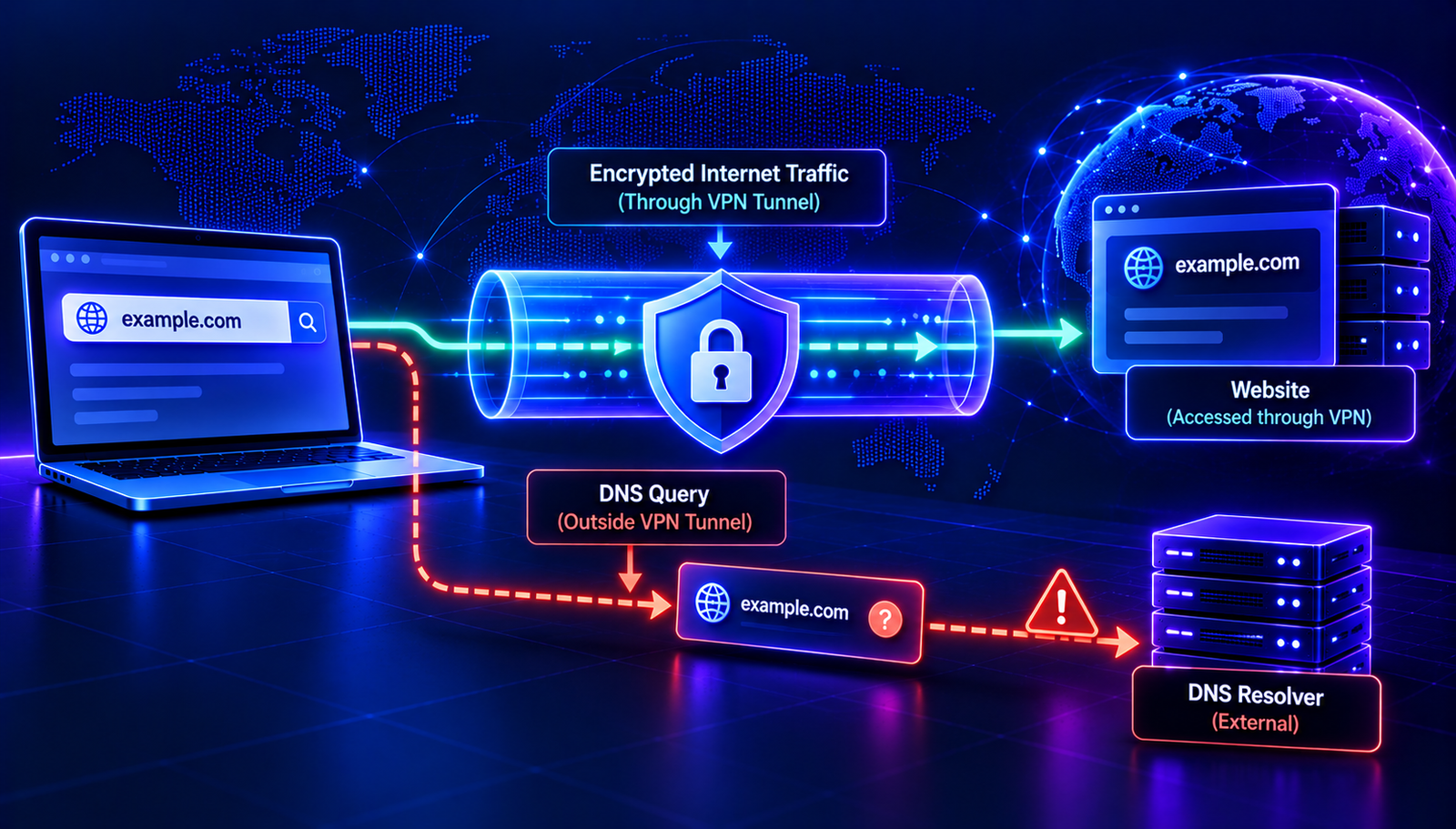
A VPN is often used to improve online privacy by routing internet traffic through a VPN server. However, your DNS requests may not always follow the same route. If those requests go to a DNS resolver outside the intended private connection, you may have a DNS leak.
A DNS leak does not automatically mean that your device has been hacked. It usually points to a configuration, routing, or privacy issue that allows DNS queries to reach a resolver you did not intend to use.
In this guide, you will learn what a DNS leak is, how it happens, what information it can expose, and how to reduce the risk with practical checks.
What Is a DNS Leak?
A DNS leak occurs when DNS queries are sent to a resolver outside the path or privacy arrangement you expected. This commonly becomes a concern when someone uses a VPN but their DNS requests still reach their internet service provider's resolver or another unintended DNS service.
DNS stands for Domain Name System. It helps translate domain names, such as example.com, into information that computers use to locate internet services.
When you visit a website, your device may send a DNS query to find the address associated with its hostname. The resolver handling that query can potentially observe the requested domain, along with technical information such as the time of the request and the source address visible to that resolver.
If your VPN is intended to keep DNS queries within its protected connection, requests that escape that connection may undermine part of your privacy goal.
How Does a DNS Leak Work?
Under normal conditions, a device sends DNS queries to a configured resolver. Depending on your network, that resolver may belong to your internet service provider, your router, a public DNS service, or a privacy-focused provider.
When a VPN is connected, the VPN application typically changes some network settings so that traffic travels through the VPN tunnel. A correctly configured VPN may also route DNS queries through its own resolver or another designated resolver.
A leak can occur when DNS requests continue using an unexpected resolver instead of the intended route. The website traffic and DNS traffic may then follow different paths.
For example, your browser might connect to a website through a VPN server while your operating system sends the domain lookup to a resolver provided by your local network. In that situation, the DNS resolver may see the requested domain even though the website connection itself uses the VPN.
What Information Can a DNS Leak Expose?
A DNS leak can expose domain lookup activity to a resolver that you did not intend to use. Depending on the network and resolver, the information may include:
- Requested domain names: The resolver may see the domains your device attempts to look up.
- Timing information: DNS queries can reveal when a device requests particular domains.
- Network information: The resolver may see the source IP address of the DNS request or other metadata, depending on the network configuration.
- Privacy preferences: The use of a particular resolver may differ from the DNS service selected by your VPN or privacy settings.
A DNS leak does not automatically reveal the full URL, page content, passwords, or messages you exchange with a website. DNS lookups generally concern hostnames. The information visible to other parties depends on the protocols and network configuration involved.
Common Causes of DNS Leaks
1. Incorrect VPN DNS Configuration
Some VPN configurations do not route DNS queries through the intended resolver. This can happen because of an application setting, a system-level DNS configuration, or a compatibility issue.
Check your VPN provider's documentation to confirm how it handles DNS requests and whether DNS leak protection is enabled.
2. IPv6 Configuration Problems
A VPN may handle IPv4 traffic correctly while IPv6 traffic follows a different route. If DNS queries or other network traffic use an unexpected IPv6 path, privacy expectations may not be met.
Do not disable IPv6 blindly. First check whether your VPN supports IPv6 and follow its recommended configuration.
3. Split Tunneling
Split tunneling allows selected traffic to bypass a VPN. Depending on the VPN application and operating system, DNS requests associated with some applications or network routes may also behave differently from expected.
Review the split-tunneling rules if you use this feature. Confirm which applications and traffic types are covered by the VPN.
4. Operating System or Network Changes
Connecting to a new Wi-Fi network, installing a network utility, changing adapter settings, or switching VPN servers can affect DNS configuration.
If a leak appears after a configuration change, compare the current network settings with the settings recommended by your VPN provider.
5. Browser Secure DNS Settings
Some browsers support Secure DNS, often implemented using DNS over HTTPS (DoH). This can cause the browser to use a different DNS resolver from the operating system.
This behavior is not automatically a DNS leak. The important question is whether the browser's selected resolver matches your privacy requirements and whether its traffic follows the intended network route.
Read More: Understand DNS Privacy and Security
These AuraTools guides explain related DNS concepts that can help you understand the risks and troubleshoot configuration problems:
- DNSSEC Explained — learn how DNSSEC helps validate DNS data.
- DNS Hijacking Explained — understand how DNS settings or responses can be manipulated.
- DNS Spoofing Explained — explore forged DNS responses and related risks.
- DNS Troubleshooting Guide — follow a structured approach to common DNS issues.
How to Check for a DNS Leak
A DNS leak test can help you identify which resolvers appear to handle your DNS queries while a VPN is connected. The results need to be interpreted carefully because a resolver's name or location alone does not prove that your connection is leaking.
Step 1: Record Your Normal Network Behavior
If you can do so safely, note which DNS service your device uses before connecting to the VPN. This provides a baseline for comparison. Avoid changing multiple DNS settings at the same time.
Step 2: Connect to Your VPN
Connect to the VPN server you normally use and wait until the application confirms that the connection is active.
Step 3: Run a DNS Leak Test
Use a reputable DNS leak testing service to inspect the resolvers visible during the test. Review the results alongside your VPN provider's documentation.
If a resolver appears to belong to your internet service provider or local network when you expected all DNS requests to use the VPN's DNS service, investigate further. However, resolver ownership and location information can be inaccurate, and some VPN providers use third-party DNS infrastructure.
Step 4: Compare Results
Repeat the test after reconnecting to the VPN or switching to a recommended server. If the resolver results change unexpectedly, check the VPN's DNS settings, split-tunneling rules, IPv6 support, and browser Secure DNS configuration.
One test is not a complete guarantee of privacy. Results can depend on the browser, operating system, network, VPN protocol, and testing method.
How to Prevent DNS Leaks
Use a VPN With DNS Leak Protection
Choose a VPN that clearly documents how it routes DNS requests and supports DNS leak protection. Keep its software updated and use the recommended connection settings.
Enable the VPN Kill Switch
A kill switch is designed to block some or all network traffic if the VPN connection drops. This can reduce the chance that traffic falls back to the regular network unexpectedly.
Behavior varies by provider and operating system. Check whether the kill switch covers DNS requests and what happens during connection failures.
Review IPv6 and Split-Tunneling Settings
Confirm that your VPN supports your device's IPv4 and IPv6 configuration. Review split-tunneling rules and avoid routing traffic outside the VPN unless you understand the privacy implications.
Configure Secure DNS Carefully
DNS over HTTPS encrypts DNS queries between a compatible client and resolver. DNS over TLS can also protect queries on supported systems and networks.
Encryption helps protect DNS requests in transit, but it does not make all DNS activity invisible. The chosen resolver can still process the queries, and the browser or application may connect to a resolver that differs from your VPN's intended service.
If your priority is to keep DNS requests within a VPN, follow the VPN provider's guidance for browser Secure DNS and system-level DNS configuration rather than enabling settings at random.
Keep Your VPN and Operating System Updated
Updates can fix network handling issues and improve compatibility. Install updates from official sources and review important configuration changes after major system or VPN upgrades.
Recheck After Network Changes
Repeat a DNS leak test after changing VPN servers, installing network software, switching networks, or changing DNS settings. Regular checks can help reveal unexpected changes before they become persistent problems.
DNS Leak vs. DNS Hijacking vs. DNS Spoofing
These terms describe different situations, even though they all involve DNS.
- DNS leak: DNS queries reach a resolver or network path outside the intended privacy arrangement.
- DNS hijacking: DNS settings, requests, or responses are redirected or manipulated by an unauthorized party or system.
- DNS spoofing: Forged DNS responses are used to provide misleading DNS information.
A DNS leak does not necessarily involve an attacker. It can result from ordinary configuration behavior. Hijacking and spoofing can involve active manipulation, although the precise circumstances vary.
Can DNSSEC Prevent DNS Leaks?
DNSSEC helps validating resolvers verify the authenticity and integrity of supported DNS data. It is designed to make certain types of DNS data manipulation more difficult.
However, DNSSEC does not route your DNS queries through a VPN, hide the domains you request from your resolver, or prevent DNS requests from taking an unexpected network path. It addresses a different security problem from DNS leak protection.
For DNS privacy, focus on the resolver you use, the route your queries follow, and the encryption provided by your DNS and VPN configuration.
Frequently Asked Questions
Is a DNS leak dangerous?
A DNS leak can reduce privacy if DNS requests reach a resolver you did not intend to use. The level of risk depends on your threat model, the information exposed, and who operates the resolver. It does not automatically mean your device is compromised.
Can a VPN completely prevent DNS leaks?
A correctly configured VPN can reduce the risk of DNS leaks, but no single setting or test guarantees that every device, application, and network condition will behave as expected. Check the provider's DNS handling and test your setup.
Does a DNS leak reveal my IP address?
The resolver may see the source address from which the DNS request arrives. If the query bypasses the VPN, this may be your public network address or another address associated with your connection. The exact information depends on routing, NAT, and the network setup.
Is DNS over HTTPS enough to prevent a DNS leak?
No. DNS over HTTPS encrypts DNS queries between the client and its selected resolver. It does not automatically ensure that the selected resolver is the one intended by your VPN or privacy policy.
Can public DNS services fix a DNS leak?
Changing to a public DNS resolver may change which service handles your queries, but it does not by itself ensure that the requests follow the intended VPN route. Configure DNS according to your privacy requirements and verify the resulting behavior.
Does DNSSEC protect my browsing privacy?
DNSSEC helps validate DNS data, but it does not encrypt DNS queries or hide requested domain names from the resolver. DNSSEC and DNS privacy technologies solve different problems.
Conclusion
A DNS leak occurs when DNS requests reach a resolver or network path outside the one you intended to use. It is especially relevant when using a VPN for privacy, but the cause may be a configuration issue rather than an attack.
To reduce the risk, use a VPN with documented DNS leak protection, review IPv6 and split-tunneling settings, configure Secure DNS carefully, and test your setup after important network changes.
Remember that DNS privacy, DNS data integrity, and website connection security are different concerns. Understanding these differences helps you choose the right protection for your needs.
Contact
Missing something?
Feel free to request missing tools or give some feedback using our contact form.
Contact Us