09
DNS Spoofing Explained: What Is It and How Can You Prevent It
Learn what DNS spoofing is, how forged DNS responses can redirect users, how DNS spoofing differs from DNS hijacking, and how to improve DNS security.
When you enter a domain name in your browser, DNS helps your device find the correct destination. But what happens if your device or DNS resolver receives a fake response?
This is the basic idea behind DNS spoofing. An attacker attempts to provide false DNS information so that a domain name resolves to an unintended IP address or destination.
In this guide, you will learn what DNS spoofing is, how it differs from DNS hijacking, how to recognize possible warning signs, and which security measures can help reduce the risk.
What Is DNS Spoofing?
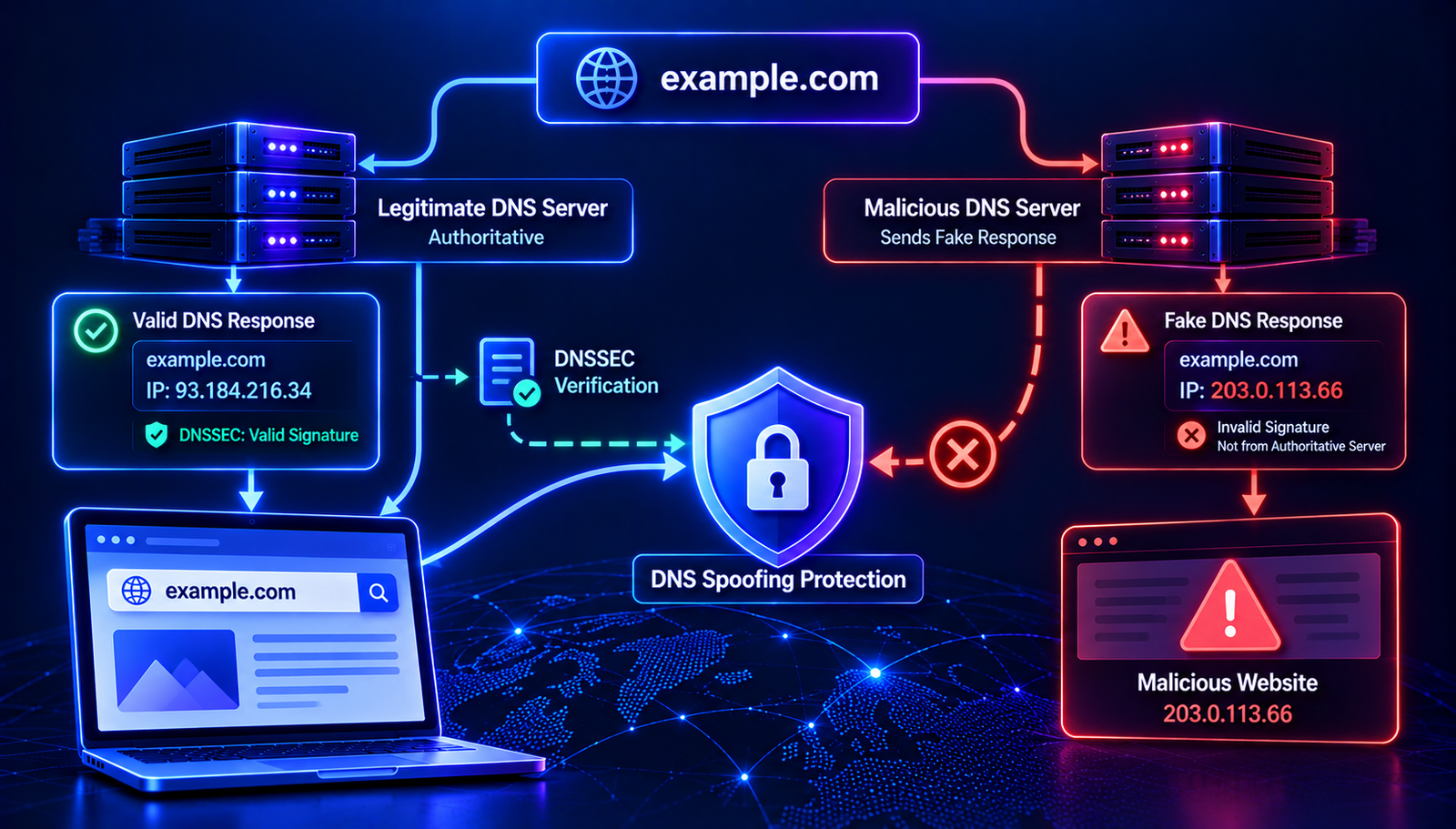
DNS spoofing is an attack in which false DNS information is presented as though it were a legitimate response. The goal may be to redirect users, interfere with network communication, or send traffic to a destination controlled by an attacker.
For example, a user may enter a familiar website address but receive an unexpected IP address from a compromised or manipulated DNS resolution process.
DNS spoofing can target an individual device, a local network, or a DNS resolver. The method and impact depend on where the false information is introduced.
How Does DNS Spoofing Work?
A DNS spoofing attack attempts to interfere with the normal process of resolving a domain name.
- A domain lookup begins. A device or application requests DNS information for a hostname.
- An attacker attempts to influence the response. The attacker may exploit a weakness in a resolver, a network, or a device.
- False DNS information is returned or accepted. If the attack succeeds, the device or resolver may use an incorrect address.
- Traffic may reach the wrong destination. The user can be redirected to an unintended server or service.
- The effect continues while the false information is used. If incorrect data is cached, the problem may persist until the cache is corrected or expires.
Not every spoofing attempt succeeds. Modern resolvers and network security controls include protections designed to make DNS response manipulation more difficult.
Read More: Related DNS Security Guides
- DNS Hijacking Explained — understand how unauthorized DNS configuration changes can redirect users.
- DNSSEC Explained — learn how cryptographic validation helps protect DNS data.
- DNS Cache Explained — understand how cached DNS information affects lookups.
Common Types of DNS Spoofing
1. DNS cache poisoning
DNS cache poisoning occurs when false DNS information is inserted into a resolver's cache. Later queries may receive the incorrect information while it remains cached.
Cache poisoning is one form of DNS spoofing. The two terms are related, but they are not always interchangeable.
2. Local network DNS manipulation
An attacker who compromises a router or network device may change DNS settings or interfere with DNS traffic. Devices using that network may then receive unexpected DNS results.
3. Compromised device DNS settings
Malware or unauthorized access may change the DNS resolver configured on a computer or mobile device. The device may start sending queries to an untrusted resolver.
4. Rogue DNS resolver
A malicious or compromised DNS resolver may intentionally return false answers. Users who rely on that resolver can be redirected to unintended destinations.
DNS Spoofing vs. DNS Hijacking
DNS spoofing and DNS hijacking are related security threats, but they describe different aspects of DNS manipulation.
- DNS spoofing: involves false DNS information or forged responses being presented as legitimate.
- DNS hijacking: broadly describes unauthorized manipulation of DNS settings or resolution, such as changing nameservers or a device's configured resolver.
- DNS cache poisoning: involves causing a resolver to store incorrect DNS information in its cache.
These techniques can overlap. For example, an attacker may compromise a router to change DNS settings, or attempt to poison a resolver's cache to influence future lookups.
Warning Signs of DNS Spoofing
Unexpected DNS behavior does not automatically prove that spoofing has occurred. Configuration errors, stale cache entries, and ordinary network issues can cause similar symptoms.
Possible warning signs include:
- A domain resolves to an unexpected IP address.
- The same domain produces inconsistent results across networks without an obvious explanation.
- Your device uses an unfamiliar DNS resolver.
- A router's DNS settings have changed without authorization.
- A website redirects unexpectedly or displays unfamiliar content.
- DNS responses differ from the values published by the authoritative DNS servers.
- Security software reports suspicious network behavior.
Investigate these signs by comparing the actual DNS results with the expected configuration. Do not assume an attack based on a single lookup result.
How to Check for Suspicious DNS Responses
Step 1: Check the domain's DNS records
Use the AuraTools DNS Lookup to inspect the records returned for a domain. Review the relevant A, AAAA, CNAME, or other record type.
Step 2: Compare different resolvers
You can use dig to query a specific DNS resolver:
dig @1.1.1.1 example.com A
Compare the result with another resolver:
dig @8.8.8.8 example.com A
Replace example.com with the domain you want to investigate. Different answers do not automatically mean spoofing; resolver caches and DNS configuration can also explain differences.
Step 3: Check the authoritative DNS servers
Verify which nameservers are authoritative for the domain, then query the appropriate authoritative server directly. This helps distinguish the published DNS data from a potentially stale or unexpected recursive response.
Step 4: Inspect your device and router
Check the configured DNS resolver and review your router settings. If the configuration differs from what you expect, investigate whether the change was intentional or authorized.
How to Prevent DNS Spoofing
1. Use DNSSEC validation
DNSSEC allows validating resolvers to verify digital signatures on DNS data. When configured correctly, it can help detect forged responses that do not match the established chain of trust.
DNSSEC does not prevent every DNS attack and does not encrypt DNS queries. It also cannot protect against every form of unauthorized DNS account access.
2. Use a trusted DNS resolver
Choose a reputable resolver and check which DNS service your devices and network use. For managed networks, restrict unauthorized changes to DNS settings.
3. Secure your router
Change default administrator credentials, install firmware updates, and disable remote administration when it is not needed. Review DNS settings if devices suddenly begin using an unfamiliar resolver.
4. Keep devices updated
Operating system and browser updates can address security weaknesses. Use reputable security software and investigate suspicious applications that may modify network settings.
5. Use HTTPS
HTTPS protects the connection between a browser and a website when the certificate is correctly validated. If DNS manipulation sends a browser to a server that does not have a valid certificate for the requested hostname, the browser should display a security warning.
Do not ignore certificate warnings or enter sensitive information on a site with an unexpected security error.
6. Protect domain and DNS accounts
Enable multifactor authentication, use unique passwords, restrict account permissions, and monitor changes to important DNS records and nameservers.
7. Monitor DNS changes
Keep a record of your expected DNS configuration and review unexpected changes to A, AAAA, CNAME, MX, TXT, and NS records. For business domains, consider using DNS change alerts and audit logs where available.
What to Do If You Suspect DNS Spoofing
If you suspect false DNS responses, follow a methodical troubleshooting process.
- Verify the expected DNS values. Compare the current results with the configuration maintained by your DNS administrator.
- Check the authoritative servers. Determine whether the authoritative DNS data is correct.
- Inspect your configured resolver. Confirm that your device and router use the intended DNS service.
- Compare resolver results. Query more than one resolver to identify inconsistent answers.
- Review local security. Check devices and routers for unauthorized changes or signs of compromise.
- Correct the affected configuration. Restore legitimate DNS settings and address the cause of the problem.
- Contact your provider if necessary. Ask your DNS provider, network administrator, or hosting provider to investigate suspicious behavior.
If a device or router appears compromised, avoid entering passwords or sensitive information through it until it has been secured. Use a trusted device to change credentials if account compromise is suspected.
Does DNS over HTTPS Prevent DNS Spoofing?
DNS over HTTPS (DoH) encrypts DNS queries between a client and its DoH resolver. DNS over TLS (DoT) provides a similar encrypted connection using TLS.
These technologies can reduce the risk of certain forms of interference between a device and its chosen resolver. However, they do not guarantee that the resolver itself is trustworthy or that the final DNS answer is correct.
DNSSEC and encrypted DNS serve different purposes. DNSSEC validates DNS data, while DoH and DoT protect the transport between the client and resolver. Depending on the environment, both can be useful.
Common DNS Spoofing Myths
Myth 1: Every unusual DNS response means an attack
Not necessarily. Caching, DNS migrations, split-horizon DNS, and configuration errors can produce different responses. Verify the authoritative data before concluding that spoofing has occurred.
Myth 2: DNSSEC encrypts DNS traffic
DNSSEC authenticates DNS data and protects its integrity through cryptographic validation. It does not provide confidentiality for DNS queries.
Myth 3: HTTPS makes DNS spoofing impossible
HTTPS helps protect the web connection and validates the server's certificate. It does not prevent DNS manipulation itself, and users should never ignore certificate warnings.
Myth 4: Clearing the DNS cache fixes every problem
Clearing a local cache can help with stale local results. It does not fix compromised DNS settings, malicious authoritative records, or problems in remote resolvers.
DNS Spoofing Prevention Checklist
- Use a trusted DNS resolver.
- Enable DNSSEC validation where supported.
- Keep operating systems, browsers, and routers updated.
- Protect router, registrar, and DNS provider accounts.
- Use HTTPS and respect certificate warnings.
- Monitor unexpected DNS record and nameserver changes.
- Compare authoritative DNS data with recursive lookup results.
- Investigate unfamiliar DNS settings or unexpected redirects.
Frequently Asked Questions
What is DNS spoofing in simple words?
DNS spoofing is an attempt to provide false DNS information so that a domain name may resolve to an unintended destination.
Is DNS spoofing the same as cache poisoning?
No. DNS cache poisoning is a specific type of attack in which incorrect DNS information is placed in a resolver's cache. DNS spoofing is a broader term for presenting false DNS information.
Can DNS spoofing redirect a website?
Yes. If an attacker successfully influences DNS resolution, a domain may resolve to an unintended IP address. HTTPS certificate validation can help protect users against some impersonation attempts.
Can DNSSEC stop DNS spoofing?
DNSSEC can help validating resolvers reject forged DNS data that fails cryptographic validation. It does not prevent every form of DNS manipulation or account compromise.
How can I check whether my DNS response is correct?
Compare the response with the authoritative DNS data and query multiple resolvers. Also check the configured DNS resolver on your device or router.
Does DNS spoofing affect email?
It can interfere with DNS information used by email systems. Unexpected DNS responses may affect mail server discovery or related authentication checks. Verify MX, SPF, DKIM, and DMARC settings when investigating email problems.
Conclusion
DNS spoofing involves false DNS information that can misdirect users or interfere with online services. Understanding how DNS responses are resolved makes it easier to identify suspicious results and separate attacks from ordinary caching or configuration problems.
Use trusted DNS services, secure your devices and domain accounts, enable DNSSEC validation where appropriate, and investigate unexpected DNS changes. You can begin your checks with the AuraTools DNS Lookup.
Contact
Missing something?
Feel free to request missing tools or give some feedback using our contact form.
Contact Us