09
DNS Hijacking Explained: What Is It and How Can You Prevent It
Learn what DNS hijacking is, how attackers manipulate DNS settings, how to identify suspicious DNS changes, and how to protect your domain and website.
Imagine entering your website's correct domain name but landing on an unexpected page. Or imagine customers reporting that your website is unavailable even though your hosting server is working normally.
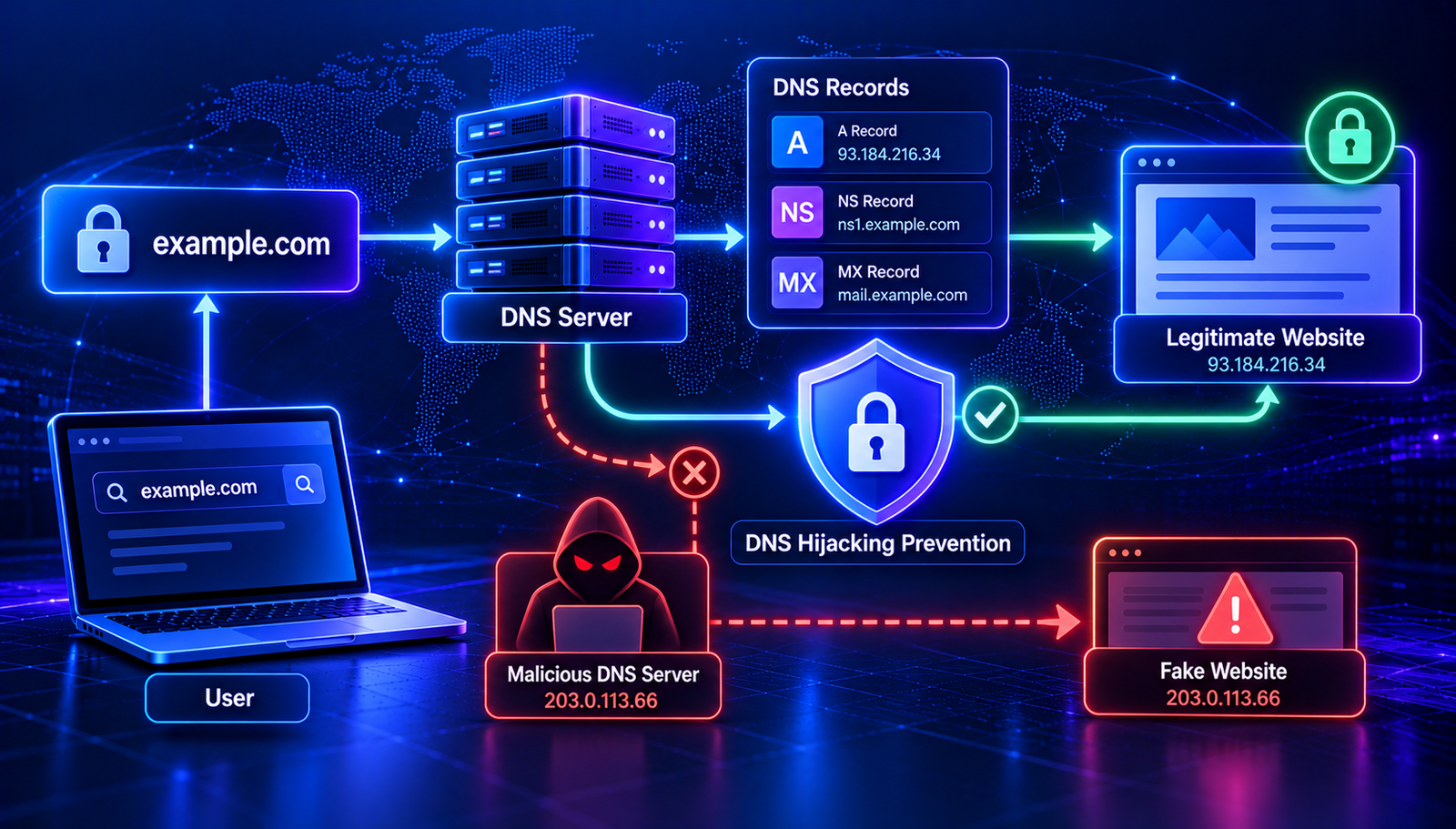
One possible cause is DNS hijacking. It occurs when DNS settings or DNS responses are maliciously altered or redirected so that users may reach an unintended destination.
In this guide, you will learn what DNS hijacking is, how it happens, how to recognize warning signs, and what steps can help protect your domain.
What Is DNS Hijacking?
DNS hijacking is a security issue in which an attacker manipulates DNS configuration or resolution to redirect users or interfere with access to online services.
DNS normally helps translate domain names into the information needed to reach websites and other services. If an attacker gains control over relevant DNS settings or interferes with DNS responses, a user may be directed somewhere other than the intended destination.
DNS hijacking can affect individual devices, local networks, DNS resolvers, domain registrar accounts, or authoritative DNS infrastructure. The cause and appropriate response depend on where the manipulation occurs.
How Does DNS Hijacking Work?
DNS hijacking can happen in several ways. The attacker may target a device, a network, a DNS service, or the domain owner's account.
1. Compromised domain registrar account
An attacker who gains access to a domain registrar account may change nameservers or other domain settings. This can redirect DNS management to infrastructure controlled by the attacker.
2. Unauthorized DNS record changes
If an attacker accesses an authoritative DNS account, they may change A, AAAA, CNAME, MX, or other records. A website hostname could be redirected to an unintended server.
3. Malicious DNS settings on a device or router
Malware or unauthorized access to a router can change the DNS resolver used by devices on a network. As a result, those devices may receive unexpected DNS responses.
4. DNS response spoofing or cache poisoning
Some DNS attacks attempt to make a resolver accept false DNS information. Successful cache poisoning can cause a resolver to return an incorrect answer to later queries.
Modern DNS infrastructure uses multiple protections to reduce these risks, but security depends on the configuration and environment.
Read More: Related DNS Security Guides
- DNSSEC Explained — understand how cryptographic DNS validation helps protect DNS data.
- DNS Cache Explained — learn how cached DNS responses can affect troubleshooting.
- DNS Propagation Explained — understand why DNS changes may take time to appear.
DNS Hijacking vs. Domain Hijacking vs. DNS Spoofing
These terms are related, but they do not always describe the same attack.
- DNS hijacking: a broad term for malicious manipulation of DNS configuration or resolution.
- Domain hijacking: unauthorized control over a domain registration or its management, often through a compromised registrar account.
- DNS spoofing: providing false DNS information or responses that claim to represent legitimate DNS data.
- DNS cache poisoning: causing a DNS resolver to store incorrect DNS information in its cache.
These attacks can overlap. For example, a compromised domain account may allow an attacker to change nameservers, while a spoofing attack may target DNS resolution without changing the domain's registrar settings.
Warning Signs of DNS Hijacking
Unusual website behavior does not automatically mean DNS hijacking has occurred. However, certain signs deserve investigation.
- Your domain's nameservers have changed without authorization.
- DNS records contain unfamiliar IP addresses or hostnames.
- Your website resolves to an unexpected destination on some networks.
- Visitors report unusual redirects or unfamiliar website content.
- Your email delivery changes after an unexpected MX record update.
- Your registrar or DNS provider reports unfamiliar account activity.
- DNS responses differ unexpectedly from the records published by your authoritative DNS provider.
Compare the actual DNS results with your intended configuration before deciding that an attack has occurred. Normal caching, migration mistakes, and incorrect settings can cause similar symptoms.
How to Check Whether Your DNS Records Have Changed
Start by checking the DNS records for your domain and comparing them with your expected values.
Step 1: Check the A and AAAA records
A records publish IPv4 addresses, while AAAA records publish IPv6 addresses. Unexpected values may indicate a configuration problem that needs investigation.
Step 2: Check the nameservers
Confirm that your domain uses the nameservers you expect. If they have changed without your approval, review your registrar account and contact your provider.
Step 3: Check CNAME records
CNAME records point a hostname to another hostname. Review unexpected destinations, especially for important subdomains.
Step 4: Review MX and TXT records
MX records determine where incoming email is directed. TXT records can contain SPF, verification, and other configuration data. Unexpected changes to these records can affect email and domain verification.
Step 5: Compare authoritative and recursive results
Check the records published by your authoritative DNS servers and compare them with responses from recursive resolvers. If only one resolver returns an unexpected result, caching or resolver-specific issues may be involved.
Use the AuraTools DNS Lookup to inspect DNS information for your domain. A lookup is a useful starting point, but it cannot independently establish whether a record change was malicious.
How to Prevent DNS Hijacking
1. Protect your domain registrar account
Use a strong, unique password and enable multifactor authentication wherever available. Restrict account access to trusted people and review account activity regularly.
2. Enable domain transfer protection
Use the registrar's available domain locking or transfer protection features. These controls can help reduce the risk of unauthorized transfers, although they do not replace account security.
3. Secure your DNS provider account
Enable multifactor authentication and limit administrative permissions. Remove unused accounts and avoid sharing administrator credentials.
4. Monitor important DNS records
Keep a record of your intended nameservers and critical DNS values. Monitor changes to A, AAAA, CNAME, MX, TXT, and NS records where practical.
5. Use DNSSEC where appropriate
DNSSEC allows validating resolvers to verify cryptographic signatures on DNS data. It can help detect certain forged or altered DNS responses.
DNSSEC does not prevent an attacker who has legitimate control of your DNS account from publishing malicious changes and signing them with authorized keys. Account security and change monitoring remain important.
6. Keep devices and routers secure
Install security updates, change default router credentials, and restrict administrative access to trusted users. Review DNS settings if your devices unexpectedly use unfamiliar resolvers.
7. Use HTTPS
HTTPS protects the connection between a browser and a website when configured correctly. Certificate validation helps prevent an attacker from silently impersonating a website with an invalid certificate.
HTTPS does not stop DNS hijacking itself. If a hostname is redirected, the unintended server would generally need a valid certificate for that hostname to impersonate the site without triggering a certificate warning.
What to Do If Your Domain Is Hijacked
If you suspect unauthorized DNS changes, focus on securing the affected accounts and restoring the correct configuration.
- Secure your registrar and DNS accounts. Use a trusted device, change compromised passwords, and revoke unauthorized sessions or credentials where possible.
- Enable multifactor authentication. Apply it to the registrar, DNS provider, and associated email account.
- Contact your providers. Report suspected unauthorized changes and request help restoring control of the domain or DNS zone.
- Review nameservers and DNS records. Restore the intended configuration after confirming the correct values.
- Check domain registration details. Look for unauthorized changes to registrant information, transfer settings, or other domain controls.
- Investigate the root cause. Review account logs, API tokens, user permissions, and affected devices.
- Verify recovery. Check authoritative DNS data, compare recursive results, and test your website and email services.
If the domain itself has been transferred or its ownership has been altered, contact the registrar immediately. Restoring DNS records alone may not be enough to recover control of a hijacked domain.
Can DNSSEC Completely Prevent DNS Hijacking?
No. DNSSEC is an important DNS security mechanism, but it addresses a specific problem: authenticating DNS data and detecting changes that do not validate against the established chain of trust.
It does not protect every point where DNS can be manipulated. An attacker who compromises a registrar or authorized DNS account may be able to make legitimate configuration changes. Malware, compromised routers, and other security weaknesses also require separate controls.
A strong defense combines DNSSEC where appropriate with secure accounts, multifactor authentication, access controls, HTTPS, software updates, and DNS change monitoring.
DNS Hijacking Prevention Checklist
- Enable multifactor authentication on registrar and DNS accounts.
- Use unique passwords and secure recovery email accounts.
- Enable available domain lock and transfer protection features.
- Review DNS records and nameserver settings regularly.
- Remove unnecessary users and revoke unused API tokens.
- Enable DNSSEC where supported and maintain correct configuration.
- Keep routers, computers, and server software updated.
- Use HTTPS with valid certificates.
- Investigate unexpected DNS changes promptly.
Frequently Asked Questions
What is DNS hijacking in simple words?
DNS hijacking happens when DNS settings or responses are manipulated so that users may be directed to an unintended destination instead of the one they expect.
Can DNS hijacking steal passwords?
DNS hijacking can redirect users to malicious destinations that attempt to steal credentials. Proper HTTPS certificate validation helps protect users from some impersonation attempts, but users should still avoid entering credentials on unfamiliar pages and should investigate unexpected redirects.
Can DNS hijacking affect email?
Yes. Unauthorized changes to MX or related DNS records can redirect email traffic or interfere with email authentication. Investigate unexpected DNS changes and verify your SPF, DKIM, and DMARC configuration.
Does DNSSEC prevent domain hijacking?
DNSSEC does not prevent unauthorized domain transfers or account takeovers. It helps validating resolvers verify signed DNS data. Registrar security and DNS account controls are still necessary.
How can I tell if a DNS record is malicious?
Compare the published record with your approved configuration, review provider activity logs, and investigate unfamiliar destinations. An unfamiliar IP address alone does not prove malicious activity.
What is the difference between DNS hijacking and DNS propagation?
DNS propagation describes how updated DNS information becomes visible through different resolvers. DNS hijacking involves malicious manipulation. An unexpected DNS response can result from normal caching or configuration errors, so investigate before drawing a conclusion.
Conclusion
DNS hijacking can redirect users, interfere with email, and disrupt online services. Protecting your domain requires more than checking individual DNS records. Secure your registrar and DNS accounts, monitor important configuration changes, and use DNSSEC and HTTPS as part of a broader security strategy.
If you notice unusual DNS behavior, compare the published records with your intended configuration and contact your provider if you suspect unauthorized access. You can begin by checking your domain with the AuraTools DNS Lookup.
Contact
Missing something?
Feel free to request missing tools or give some feedback using our contact form.
Contact Us