09
DNS Cache Explained: What Is DNS Caching and How Does It Work
Learn what DNS caching is, how DNS resolvers store lookup results, how TTL affects cached records, and how to troubleshoot outdated DNS information.
Have you ever changed your website's IP address but continued seeing the old website? Or found that a domain works on one device but not another? DNS caching may be one reason.
DNS caching helps websites load efficiently by storing previously retrieved DNS information for a limited time. Instead of looking up the same domain information from scratch for every connection, a DNS resolver or device may reuse a cached response while it remains valid.
In this guide, you will learn what DNS cache is, how DNS caching works, how TTL affects cached records, and what you can do when outdated DNS information causes problems.
What Is DNS Cache?
A DNS cache is temporary storage for information obtained through DNS lookups. It can contain records such as A, AAAA, CNAME, and MX responses, along with other DNS data.
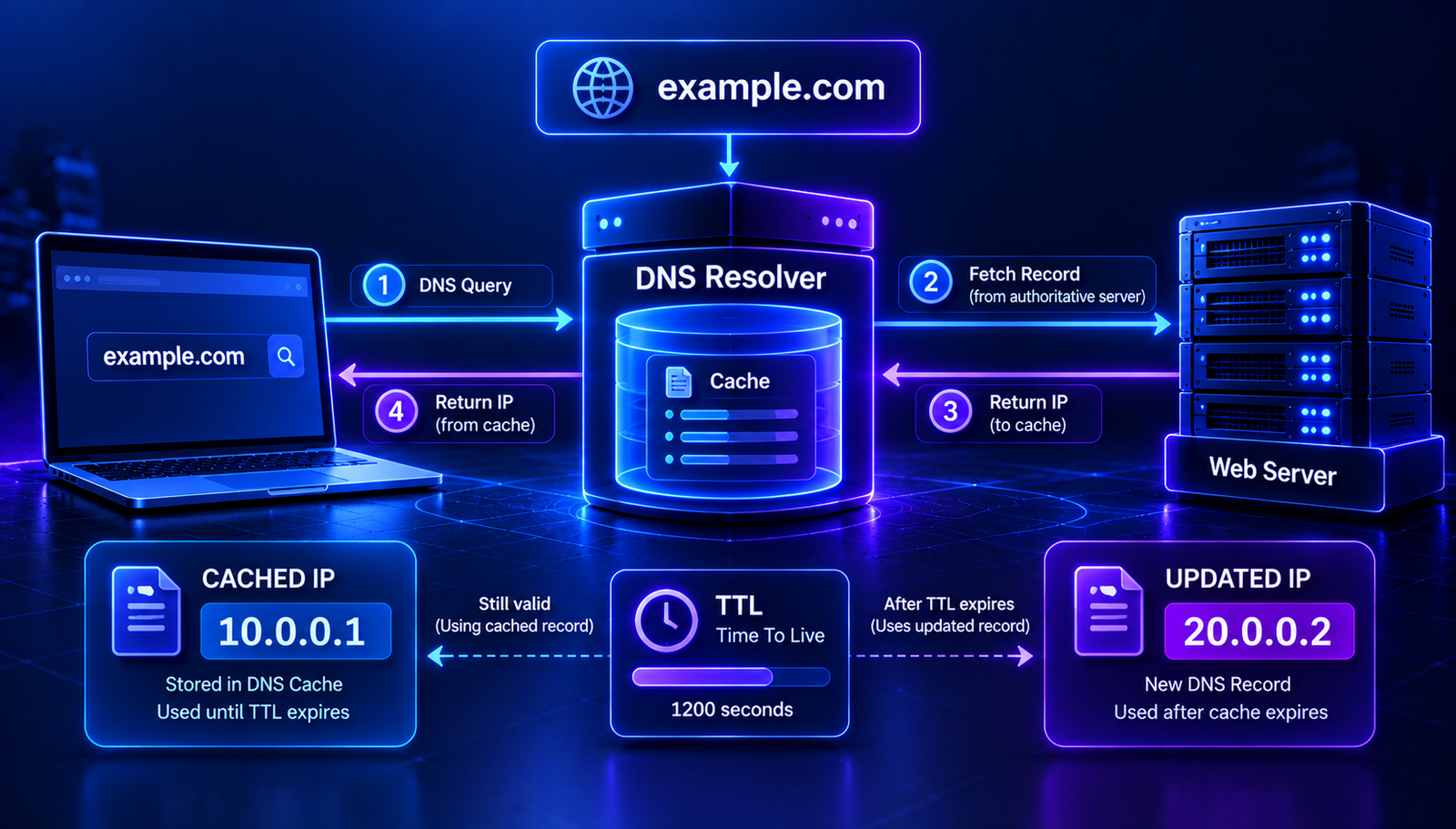
For example, when your device looks up example.com, a DNS resolver may retrieve the domain's IP address and cache the response. If the same information is requested again while the cached entry is valid, the resolver can often return it without repeating the full lookup process.
DNS caching reduces repeated queries and can improve lookup speed. However, it can also mean that an older DNS answer remains available for a while after a record changes.
How Does DNS Caching Work?
DNS caching can happen at multiple points, including your device, operating system, local network, recursive DNS resolver, and other DNS infrastructure.
A simplified process looks like this:
Browser or application
        ↓
Device DNS cache
        ↓
Recursive DNS resolver
        ↓
Cached answer or DNS lookup
        ↓
DNS response returned
When a valid cached answer exists, the system may reuse it. If no suitable cached answer is available, the recursive resolver can query the DNS hierarchy to obtain the required information.
Different systems can have different cache contents. This is one reason two devices may temporarily receive different DNS answers.
What Is DNS TTL?
TTL stands for Time to Live. It specifies how long a DNS record may be cached before it should be considered expired.
For example, a DNS record with a TTL of 3600 seconds has a TTL value of one hour.
TTL: 3600 seconds
Equivalent: 1 hour
While a cached entry remains valid, a resolver can reuse it. As the cache ages, the remaining TTL decreases. Once the entry expires, the resolver generally needs to obtain fresh information before using it for a new answer.
TTL is an important setting when planning DNS changes, moving a website, or troubleshooting an outdated record.
Read More: Related DNS Guides
- DNS Propagation Explained — understand why DNS changes may appear at different times.
- DNS Lookup: How to Check DNS Records — learn how to inspect DNS information for a domain.
- A Record vs CNAME — understand two common DNS record types.
Why Does DNS Cache Matter?
1. Faster DNS lookups
Cached DNS responses can be returned without repeating all the steps required for a fresh lookup. This can reduce lookup time and improve efficiency.
2. Fewer repeated DNS queries
When a resolver can reuse cached information, it does not need to send a new set of DNS queries for every request. This helps reduce unnecessary DNS traffic.
3. More efficient website connections
DNS caching can help browsers and applications obtain destination addresses more quickly. The actual page-loading speed also depends on network latency, server performance, and other factors.
4. Temporary differences after DNS changes
Cached responses may continue to show an older IP address or hostname after a DNS record has been updated. Different resolvers can retain cached data for different periods depending on when they obtained it.
DNS Cache vs DNS Propagation
DNS caching and DNS propagation are related, but they are not the same thing.
- DNS caching is the storage and reuse of DNS responses.
- DNS propagation is the common term used to describe updated DNS information becoming visible through different resolvers and networks.
When someone says that a DNS change has not propagated, the issue may involve an old cached answer. It can also involve incorrect authoritative DNS settings, nameserver delegation, or another configuration problem.
For this reason, waiting is not always the solution. It is useful to check what the authoritative DNS servers and recursive resolvers are actually returning.
Where Can DNS Information Be Cached?
Browser or application cache
Some browsers and applications maintain their own DNS-related caches or use operating-system networking services. Their behavior depends on the software and platform.
Operating system cache
Your operating system may temporarily store DNS lookup results. Flushing this cache can help when your own computer continues using an outdated answer.
Router or local network
Some routers and local DNS services cache DNS responses for devices on the network. Restarting or clearing a local DNS service may help in certain situations, but the available options depend on the equipment.
Recursive DNS resolver
Public DNS services, internet service providers, and private network resolvers can cache DNS responses. Clearing the cache on your own computer does not clear these remote caches.
How to Clear DNS Cache on Your Computer
If your computer continues resolving a domain to an outdated address, clearing its local DNS cache can be a useful troubleshooting step.
Windows
Open Command Prompt and run:
ipconfig /flushdns
Windows should report whether the DNS resolver cache was successfully flushed.
macOS
DNS cache clearing commands can vary by macOS version. On many recent versions, you can open Terminal and run:
sudo dscacheutil -flushcache
sudo killall -HUP mDNSResponder
You may need administrator authentication. If these commands do not apply to your macOS version, check Apple's current support guidance for your release.
Linux
Linux DNS caching depends on the distribution and the services installed. If your system uses systemd-resolved, you can try:
sudo resolvectl flush-caches
If you use another local caching service, the appropriate command will be different.
Flushing your computer's DNS cache does not remove cached responses from public DNS resolvers or other devices.
How to Check Whether a DNS Cache Is Causing the Problem
If a website still points to an old server, compare DNS responses instead of relying on a single browser test.
Step 1: Check the current DNS record
Use the AuraTools DNS Lookup to inspect the record you changed. For an IPv4 address change, check the A record. If the domain uses IPv6, check its AAAA record as well.
Step 2: Query a public DNS resolver
For example, use dig to query a specific resolver:
dig @1.1.1.1 example.com A
You can compare it with another resolver:
dig @8.8.8.8 example.com A
Replace example.com with your domain. Different results can indicate different cache states or differences in the DNS resolution path.
Step 3: Check the authoritative DNS response
Confirm that the authoritative DNS servers return the record you intended to publish. If the authoritative response is incorrect, investigate the DNS configuration before assuming that caching is the cause.
Step 4: Test from another network
Try the domain using a different network or device. If the results differ, the issue may involve local caching, the configured resolver, or another network-specific factor.
Can You Prevent DNS Cache Problems?
You cannot eliminate DNS caching entirely, and you generally should not try to do so. Caching is a normal part of efficient DNS operation.
Instead, plan important DNS changes carefully.
- Review the current TTL before changing records.
- Lower TTL ahead of a planned migration when appropriate, allowing the previous TTL period to pass before making the change.
- Confirm that the authoritative DNS configuration is correct.
- Keep old website infrastructure available during a transition when practical.
- Check important records from multiple resolvers after the change.
- Avoid repeatedly editing DNS records without identifying the cause of the problem.
Lowering TTL shortly before a migration does not instantly expire records already cached with a longer TTL. Planning ahead is important.
Common DNS Cache Problems and Fixes
1. A website still opens on the old server
Possible cause: A resolver or device is still using an older cached A or AAAA response.
What to do: Compare the authoritative response with responses from different resolvers. Flush your local DNS cache if the issue appears to be limited to your device.
2. A website works on mobile data but not on Wi-Fi
Possible cause: The two networks may use different DNS resolvers or cached answers.
What to do: Compare DNS results on both networks and check the DNS configuration of your router or local network if necessary.
3. A DNS record is missing from one resolver
Possible cause: The resolver may have cached a previous response, or the record may not be published correctly on the authoritative servers.
What to do: Query the authoritative servers and compare results from multiple resolvers. Check the exact hostname and record type.
4. Email still goes to the old mail server
Possible cause: A sending system may still be using cached MX information.
What to do: Verify the current MX records and allow for relevant cache periods. Keep the previous mail service available during a planned migration when possible.
Frequently Asked Questions
What is DNS cache in simple words?
DNS cache is temporary storage for domain lookup results. It helps devices and resolvers reuse DNS information without repeating the same lookup every time.
How long does DNS cache last?
The duration depends on the record's TTL and the caching behavior of the system involved. A TTL of 3600 seconds represents one hour, although different cache layers and resolver policies can affect observed behavior.
Does flushing DNS cache speed up the internet?
Flushing DNS can help resolve certain outdated DNS answers, but it does not generally make your internet connection faster. After flushing, some domains may require fresh lookups.
Does clearing DNS cache delete DNS records?
No. Clearing a local cache removes stored lookup information from the relevant cache. It does not delete records from your domain's authoritative DNS zone.
Why does DNS work on one device but not another?
Devices may use different DNS resolvers or have different cached responses. They may also have different network settings, so compare their DNS results before deciding that caching is the cause.
Does DNS cache affect email?
Yes. Cached MX records can influence which mail server a sending system attempts to contact. SPF, DKIM, and DMARC checks may also involve DNS lookups, although each has its own purpose and behavior.
Conclusion
DNS caching helps make domain lookups more efficient, but it can also explain why an old DNS response remains visible after a record has changed.
When troubleshooting, check the authoritative DNS configuration first. Then compare results from different resolvers and clear the local cache if needed. Understanding TTL and cache behavior can help you diagnose DNS issues without making unnecessary changes.
For your next DNS check, use the AuraTools DNS Lookup to inspect the records currently returned for your domain.
Contact
Missing something?
Feel free to request missing tools or give some feedback using our contact form.
Contact Us