26
DNS Lookup: How to Check DNS Records for Any Domain
Learn what a DNS lookup is and how to check A, AAAA, MX, TXT, CNAME and NS records for any domain. See simple online and command-line methods.
When a website does not load, email stops working or a domain points to the wrong server, DNS is often one of the first things worth checking.
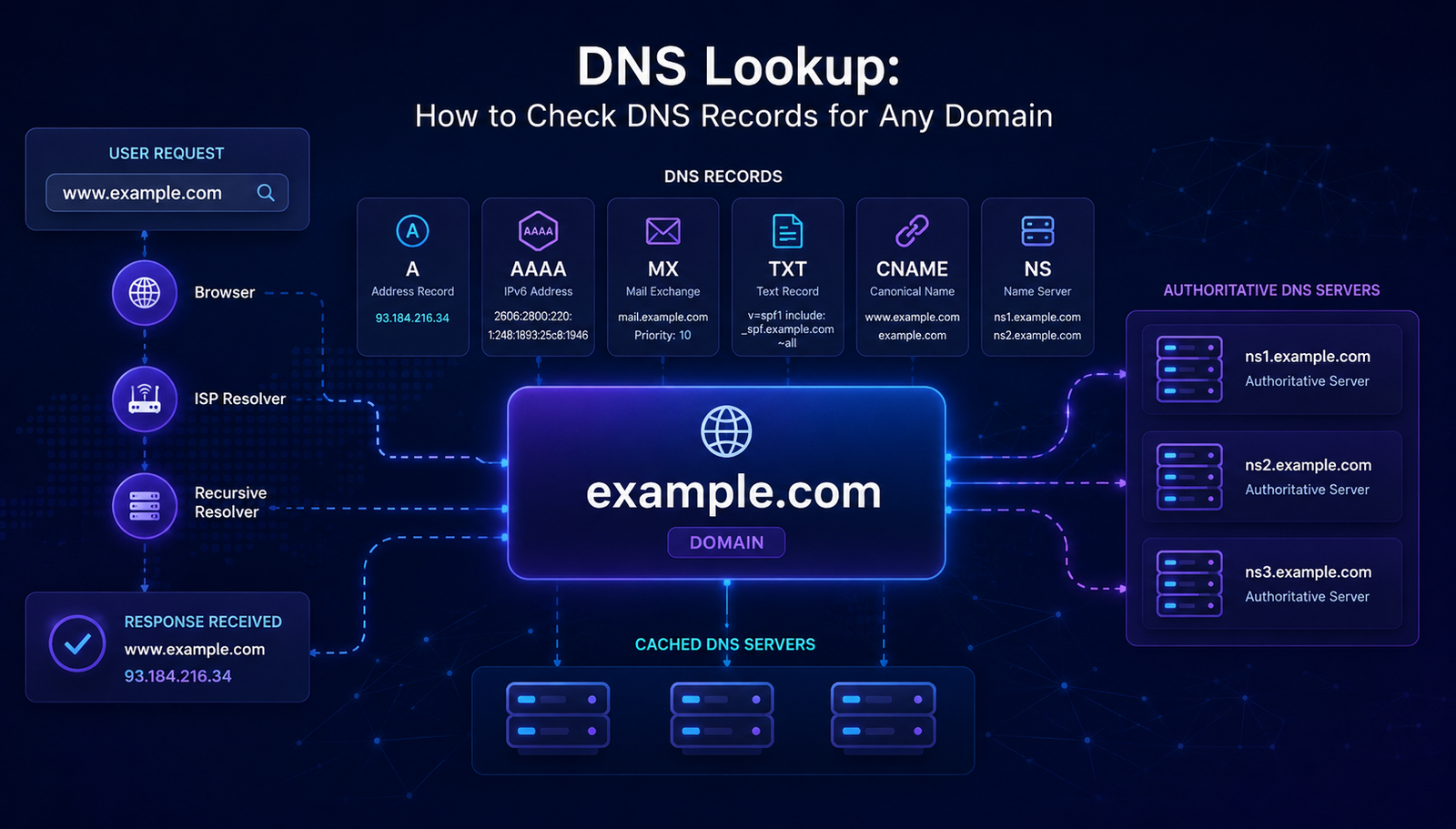
A DNS lookup lets you see the DNS records connected to a domain. These records can tell you where a domain points, which servers handle its email and which nameservers are responsible for its DNS.
You do not need to be a network expert to perform a DNS lookup. You can check DNS records online with AuraTools or use simple commands such as nslookup and dig.
In this guide, you will learn what a DNS lookup is, how DNS records work and how to check the most common records for any domain.
What Is a DNS Lookup?
A DNS lookup is a request used to find information about a domain through the Domain Name System.
DNS helps connect human-readable domain names with the technical information computers need to communicate over the internet. For example, when you enter a domain name in your browser, your device needs to find the appropriate IP address before it can connect to the website.
A DNS lookup can show different types of information depending on the record being requested.
For example, an A record can point a domain to an IPv4 address. An MX record can identify the mail servers used for email. A TXT record can contain text-based information used for verification and email security.
Why Would You Need a DNS Lookup?
There are many practical reasons to check DNS records.
You may want to perform a DNS lookup when:
- A website is not opening
- A domain was recently moved to a new host
- You changed nameservers
- Email is not being delivered
- You are setting up SPF or DKIM
- You need to verify a TXT record
- You want to check a CNAME
- You are troubleshooting a subdomain
- You want to confirm where a domain points
- You are checking whether a DNS change is visible
DNS problems can be confusing because the domain itself may still be registered and active while one or more records are incorrect.
A quick DNS lookup can help narrow down the problem.
Common DNS Records Explained
A domain can have several types of DNS records. Each one has a different job.
A Record
An A record connects a domain or hostname to an IPv4 address.
example.com → 192.0.2.10
If you want to know which IPv4 address a domain currently points to, an A record lookup is a useful place to start. You can also use the AuraTools IP Information tool when you need more information about an IP address.
AAAA Record
An AAAA record performs a similar job for IPv6 addresses.
While an A record uses IPv4, an AAAA record points to an IPv6 address.
A website can have both A and AAAA records.
CNAME Record
A CNAME record creates an alias from one hostname to another hostname.
www.example.com → example.com
CNAME records are common when a service or subdomain needs to point to another hostname instead of directly using an IP address.
MX Record
An MX record tells other mail systems where email for a domain should be delivered.
If your website works but incoming email does not, checking the MX records can be a useful troubleshooting step.
MX records can also have priority values. When multiple mail servers are configured, the priority helps determine which server should be preferred.
TXT Record
A TXT record stores text information associated with a domain.
TXT records are widely used for domain verification and email-related security systems.
For example, SPF information is commonly published through a TXT record. Other services may also ask you to add a TXT record to prove domain ownership.
NS Record
An NS record identifies the nameservers responsible for a domain's DNS.
Nameservers are important because they tell DNS resolvers where the authoritative DNS information for a domain can be found.
If you recently changed DNS providers, checking NS records can help confirm whether the domain is using the expected nameservers.
SOA Record
The SOA record contains important information about the DNS zone.
It can include information such as the primary nameserver and timing values used by DNS systems.
You normally do not need to change an SOA record manually, but it can be useful when troubleshooting DNS behavior.
How to Check DNS Records Online
The easiest way for most people to perform a DNS lookup is through an online DNS lookup tool.
You do not need to install software or remember command-line syntax.
Step 1: Enter the Domain
Open the AuraTools DNS Lookup tool and enter the domain you want to check.
example.com
You normally do not need to enter https://.
Step 2: Choose the Record Type
If the tool allows you to select a record type, choose the type you want to investigate.
- A
- AAAA
- CNAME
- MX
- TXT
- NS
- SOA
If you are not sure what is wrong, checking the available records can give you a broader view.
Step 3: Run the Lookup
Start the lookup.
The tool sends a DNS query and displays the available response.
Depending on the tool, you may see the record type, value, TTL and other information.
Step 4: Read the Result
Do not worry if the result looks technical at first.
Start with the record type you need.
If you are checking where a website points, look at the A and AAAA records.
If you are checking email, look at MX and relevant TXT records.
If you are checking the DNS provider, look at the NS records.
How to Check DNS Records on Windows
Windows includes a command called nslookup.
Open Command Prompt and enter:
nslookup example.com
This performs a basic DNS lookup.
To check a specific record type, you can use:
nslookup -type=MX example.com
For a TXT record:
nslookup -type=TXT example.com
For an NS record:
nslookup -type=NS example.com
This can be useful when you want to troubleshoot DNS without using a web-based tool.
How to Check DNS Records on macOS or Linux
macOS and Linux users can use dig.
For an A record:
dig example.com A
For an MX record:
dig example.com MX
For a TXT record:
dig example.com TXT
For nameservers:
dig example.com NS
If you only want a shorter result, you can use:
dig example.com A +short
These commands are especially useful for developers and system administrators who need more control over DNS queries.
What Is DNS Propagation?
One of the most common sources of confusion after changing DNS records is propagation.
You change a record at your DNS provider and expect every user to see the new value immediately.
That does not always happen.
DNS information can be cached by different resolvers. The TTL, or Time to Live, tells DNS systems how long a record can be cached before it should be queried again.
This means different networks may temporarily return different results after a DNS change.
If you recently changed an A record and still see the old IP address, the problem may not be with the new record itself.
It may simply take time for cached information to expire.
How to Check if a DNS Change Worked
Suppose you moved your website from one hosting provider to another.
You changed the A record to the new server IP.
A good verification process is:
- Check the A record.
- Check the AAAA record if you use IPv6.
- Check the nameservers.
- Compare results from more than one DNS resolver.
- Check the website itself.
- Check email records if email was also moved.
If you want to investigate the IP address returned by DNS, the IP Information tool can provide additional information about that address.
You can also use IP to Hostname or Hostname to IP when troubleshooting the relationship between a hostname and an IP address.
DNS Lookup vs DNS Propagation Check
These terms are related but they are not exactly the same.
A DNS lookup asks for DNS information for a domain.
A DNS propagation check focuses on whether DNS changes are visible from different DNS resolvers or locations.
For example, if you changed an A record from one IP address to another, a DNS lookup can show what a particular resolver currently sees.
A propagation check can help you compare results from multiple locations or resolvers.
Can a DNS Lookup Show Who Owns a Domain?
Not necessarily.
DNS records can show technical information about a domain, but they are not a reliable way to determine the identity of a domain owner.
If you need registration information, you can use the AuraTools Domain WHOIS tool to check available domain registration information.
Privacy protection and registry policies can also limit the information that is publicly available.
So do not treat a DNS lookup as proof of ownership.
Is DNS Lookup Safe?
DNS records are designed to be queried as part of normal internet operation.
Checking public DNS records for a domain is generally a normal technical activity.
However, you should still use technical information responsibly.
A DNS lookup does not give you permission to access a private system or perform unauthorized security testing.
If you are troubleshooting a website or domain that you do not own, make sure your activity remains within the permissions and rules that apply to that system.
Common DNS Lookup Problems
No DNS Records Are Returned
The domain may not exist, the requested record type may not be configured or the DNS server may not have a valid response.
The Old IP Address Is Still Showing
This can happen because of DNS caching and TTL values.
The Website Works but Email Does Not
Check the MX records and the relevant TXT records.
The Domain Works Without www but Not With www
Check the DNS records for both the root domain and the www hostname.
They may not be configured in the same way.
DNS Shows an Unexpected Server
Check the A, AAAA, CNAME and NS records.
A CDN, proxy or hosting migration can make the result different from what you expect.
If you are also investigating the HTTP response from a website, the HTTP Status Code Checker can help you see the status returned by a URL.
Why DNS Records Matter for Website Owners
DNS is not only about making a website open.
DNS records can be involved in:
- Website hosting
- Email delivery
- Domain verification
- CDN configuration
- SSL certificate validation
- Email authentication
- Subdomains
- Third-party service setup
A small DNS mistake can sometimes affect an entire service.
That is why learning how to perform a DNS lookup is a useful skill for website owners and developers.
Check DNS Records with AuraTools
If you need a quick way to inspect DNS information, you can use the AuraTools DNS Lookup tool.
It is designed to make DNS checks easier without requiring command-line tools.
Enter the domain you want to investigate and review the available DNS information.
For common troubleshooting tasks, an online DNS lookup can be faster than opening a terminal and remembering different commands.
Try the AuraTools DNS Lookup Tool
After checking DNS, you can also use the URL Parser when you need to inspect the individual parts of a URL.
Related AuraTools
If you are troubleshooting a domain or website, these tools may also be useful:
- DNS Lookup — Check DNS records for a domain.
- Domain WHOIS — Check available domain registration information.
- IP Information — Get information about an IP address.
- IP to Hostname — Find a hostname associated with an IP address.
- Hostname to IP — Find an IP address from a hostname.
- HTTP Status Code Checker — Check the HTTP status returned by a URL.
- URL Parser — Inspect and break down a URL.
Final Thoughts
A DNS lookup is one of the simplest ways to understand what is happening behind a domain name.
You can use it to check where a website points, find mail servers, verify nameservers and investigate DNS changes.
You do not need advanced networking knowledge to get started.
For a quick check, an online DNS lookup tool is usually enough. If you need more control, commands such as nslookup and dig provide useful options for developers and system administrators.
The important thing is to look at the right record for the problem you are trying to solve.
If a website is not loading, start with A and AAAA records.
If email is having problems, check MX and relevant TXT records.
If you changed DNS providers, check the NS records.
Once you understand these basics, DNS becomes much easier to troubleshoot.
Frequently Asked Questions
What is a DNS lookup?
A DNS lookup retrieves DNS information associated with a domain. Depending on the query, it can return records such as A, AAAA, MX, TXT, CNAME, NS and SOA.
How do I check DNS records for a domain?
You can use an online DNS lookup tool or command-line utilities such as nslookup and dig.
What does an A record show?
An A record normally maps a hostname to an IPv4 address.
What does an MX record show?
An MX record identifies the mail servers responsible for receiving email for a domain.
What is a TXT record used for?
TXT records can store text information used for purposes such as domain verification and email authentication.
How long does DNS propagation take?
The time can vary because DNS information may be cached by different resolvers. TTL values influence how long cached information can remain available.
Can I check DNS records without installing software?
Yes. A web-based DNS lookup tool can perform common DNS checks directly from your browser.
Is a DNS lookup the same as a WHOIS lookup?
No. A DNS lookup checks DNS records. A WHOIS lookup provides different types of domain registration information.
Read More
- DNS Lookup: How to Check DNS Records for Any Domain — Revisit this complete DNS lookup guide and use the related AuraTools utilities when troubleshooting a domain.
Contact
Missing something?
Feel free to request missing tools or give some feedback using our contact form.
Contact Us