19
HTTP Status Codes Explained: 200, 301, 404 and 500
Learn what HTTP status codes mean, how 200, 301, 404, 403, 429, and 500 errors work, and how to troubleshoot common website problems.
Introduction
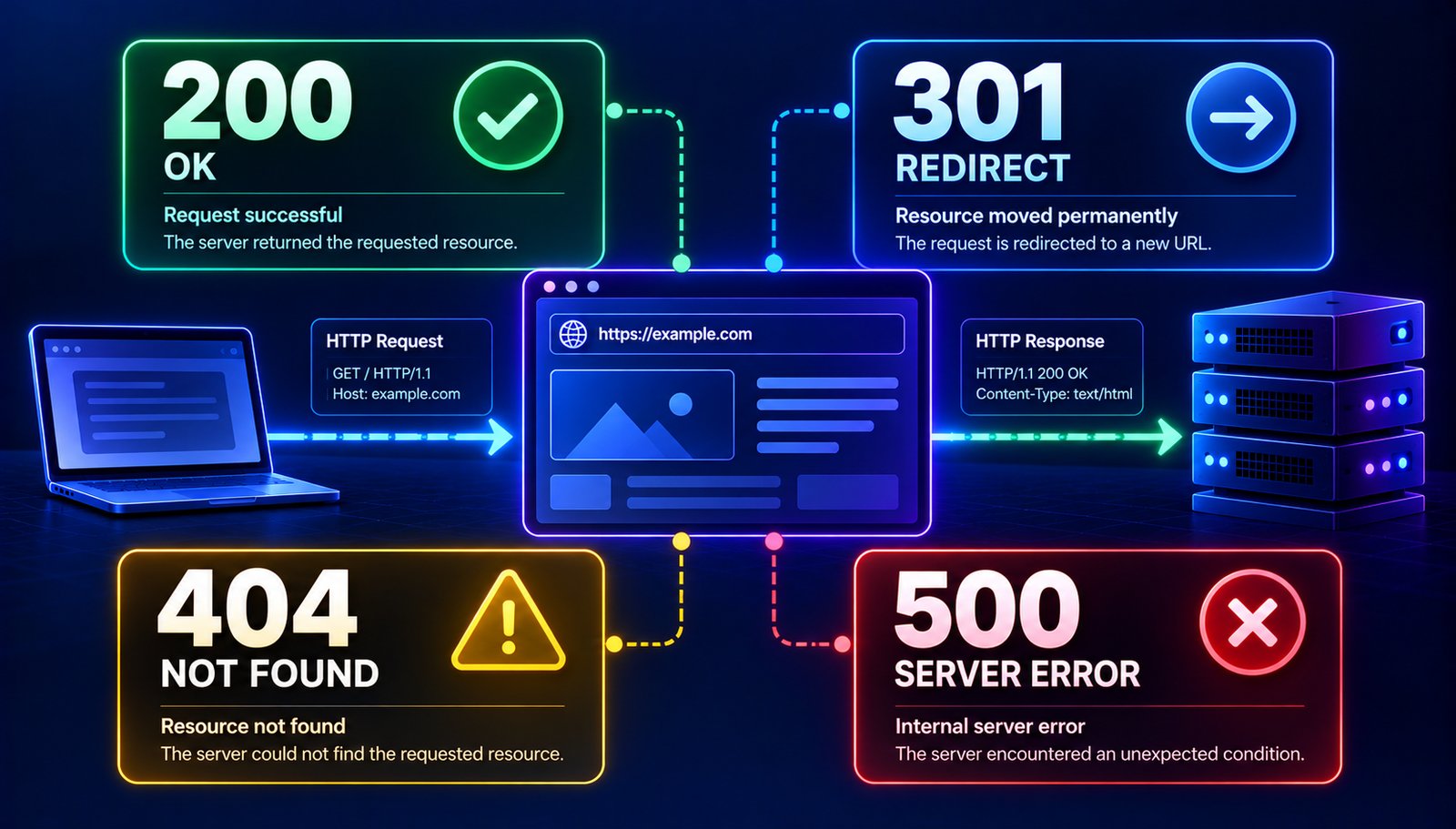
When you visit a website, your browser sends a request to a web server. The server processes that request and returns a response. Part of that response is an HTTP status code.
You may never notice these codes when a website works correctly. However, they become important when a page redirects, access is denied, a resource cannot be found, or a server encounters an error.
Understanding HTTP status codes can help website owners diagnose broken links, developers troubleshoot applications, and SEO professionals investigate indexing and redirect problems.
This guide explains the most common HTTP status codes, what causes them, and what you can do when they appear.
What Are HTTP Status Codes?
HTTP status codes are three-digit numbers included in an HTTP response. They communicate the general result of a request between a client, such as a web browser, and a server.
Status codes are divided into five groups.
Code rangeCategoryGeneral meaning
100–199 | Informational | The request is continuing or additional action is expected
200–299 | Success | The request was successfully processed
300–399 | Redirection | The client needs to follow a redirect or take another step
400–499 | Client errors | Something about the request prevents it from succeeding
500–599 | Server errors | The server failed to complete an apparently valid request
The code alone does not always explain the underlying problem. For example, a 404 response tells you that the requested resource was not found, but it does not tell you whether the URL was mistyped, the page was removed, or an internal link is outdated.
Common HTTP Status Codes Explained
200 OK
A 200 status code means the server successfully handled the request. For a normal webpage, this usually means the page was returned successfully.
Example: A visitor opens a published article, and the server returns its content with a 200 response.
What to check: If the page is intended to be publicly accessible, a 200 response is generally expected. However, a 200 code does not guarantee that the page contains useful content or is eligible for search indexing.
201 Created
The 201 status code indicates that a request successfully created a resource.
It commonly appears in APIs when an application creates a new record, such as a user profile, order, or database entry.
Example: An API receives a valid request to create a project and returns a 201 response.
301 Moved Permanently
A 301 response indicates that a resource has permanently moved to another URL.
Example:
https://example.com/old-page
redirects to:
https://example.com/new-page
A 301 redirect is commonly used when a website changes its URL structure, moves to a new domain, or consolidates duplicate pages.
Troubleshooting tips:
- Confirm that the destination URL is correct.
- Avoid unnecessary chains of redirects.
- Update internal links to point directly to the final destination.
- Check that the destination page returns the expected response.
For SEO, a properly implemented permanent redirect helps communicate that the original URL has moved. It does not guarantee that search rankings will remain unchanged.
302 Found
A 302 response indicates a temporary redirect. The requested resource is temporarily available at another location.
Use temporary redirects when the original URL is expected to remain the primary destination after the temporary situation ends.
Do not choose a redirect status solely because it is familiar. Select the response that accurately reflects whether the move is temporary or permanent.
304 Not Modified
A 304 response is associated with conditional requests and caching. It tells the client that the requested resource has not changed relative to the version it already has, so the client can reuse its cached copy.
This can reduce unnecessary data transfers and improve efficiency.
A 304 response is not normally a website error. It is part of how HTTP caching works.
400 Bad Request
A 400 response means the server cannot or will not process a request because it considers the request invalid.
Possible causes include malformed request data, invalid parameters, or incorrectly formatted input.
How to investigate it:
- Check the URL and submitted data.
- Verify request parameters and headers when working with an API.
- Review application logs for details.
- Test whether the issue occurs with a different valid request.
The exact cause depends on how the server or application validates requests.
401 Unauthorized
A 401 response means the request lacks valid authentication credentials for the requested resource.
For example, an API may require an access token before allowing a request.
Check whether you are signed in, whether your credentials are valid, and whether the authentication method matches the service's requirements.
403 Forbidden
A 403 response means the server refuses to fulfill the request. Authentication alone may not resolve it because the user or request might not have permission to access the resource.
Possible causes include access-control rules, file permissions, security filters, or application-level restrictions.
What to check:
- Verify the user's permissions.
- Review server and application access rules.
- Check whether a security service is blocking the request.
- Inspect server logs if you administer the website.
Do not change permissions broadly just to make the error disappear. Identify the rule causing the denial first.
404 Not Found
A 404 response means the server cannot find the requested resource.
It is common when a page has been deleted, a URL has changed, or a visitor follows a broken link.
Example: A website links to /guides/http-errors, but the published page now uses a different URL.
How to fix it:
- Check for spelling mistakes in the URL.
- Confirm that the page exists and is published.
- Repair broken internal links.
- Add a redirect if the page has moved to a relevant replacement.
- If the page was intentionally removed and has no replacement, return an appropriate not-found response.
A 404 response is not automatically an SEO problem. It becomes more concerning when important pages accidentally return 404 responses or valuable internal links point to missing pages.
410 Gone
A 410 response indicates that a resource is no longer available and that the removal is considered intentional.
It can be appropriate when a page has been permanently removed and there is no replacement. The correct response depends on the reason for removal and the site's routing behavior.
429 Too Many Requests
A 429 response means the server is limiting requests because too many have been made within a particular period.
APIs and websites may use rate limits to protect their infrastructure from excessive traffic.
How to resolve it:
- Reduce the frequency of requests.
- Respect any Retry-After header returned by the server.
- Use appropriate caching where possible.
- Review the service's documented rate limits.
Do not attempt to bypass rate limits. If you believe the limit was applied incorrectly, contact the service administrator.
500 Internal Server Error
A 500 response indicates that the server encountered an unexpected condition and could not complete the request.
The response itself usually does not identify the underlying cause.
Common possibilities include application exceptions, configuration problems, or failures in a dependency.
If you manage the website:
- Check application and server error logs.
- Identify recent code or configuration changes.
- Confirm that required services and dependencies are available.
- Reproduce the issue in a controlled environment.
- Apply a targeted fix and test the affected route.
Avoid displaying sensitive debugging details to public visitors.
502 Bad Gateway
A 502 response usually means that a server acting as a gateway or proxy received an invalid response from an upstream server.
For example, a reverse proxy may be unable to obtain a valid response from the application server.
Check the upstream service, proxy configuration, and relevant logs to identify where communication failed.
503 Service Unavailable
A 503 response indicates that the server is temporarily unable to handle the request.
Possible causes include maintenance, temporary overload, or an unavailable dependency.
If the downtime is temporary, the server may include a Retry-After header to suggest when the client should try again.
For website owners, the next step is to check resource usage, service health, maintenance settings, and application logs.
504 Gateway Timeout
A 504 response means a gateway or proxy did not receive a timely response from an upstream server.
The underlying application might be slow, overloaded, or unable to complete a dependency request within the configured timeout.
Investigate application response times, database queries, network connectivity, and proxy timeout settings. Increasing a timeout without fixing the underlying delay may only hide the symptom.
How to Check an HTTP Status Code
You can inspect HTTP status codes in several ways. The best method depends on whether you are checking one page, debugging an application, or investigating a larger website.
Method 1: Use Browser Developer Tools
Most modern desktop browsers include developer tools that show network requests and responses.
- Open the webpage you want to inspect.
- Open Developer Tools using your browser's menu or keyboard shortcut.
- Select the Network tab.
- Reload the page.
- Select the main document request.
- Look for its status code in the request list or response details.
This method is useful because it shows the response received by your browser and can reveal redirects or failed resources. The main document and individual images, scripts, or API requests may have different status codes.
Method 2: Use the curl Command
If you have access to a terminal, curl can inspect HTTP responses.
To display response headers:
curl -I https://example.com/
To follow redirects and show the final response headers:
curl -IL https://example.com/
The -I option requests headers, while -L follows redirects. Server behavior can vary, so a headers-only request may not behave exactly like a normal browser request.
To inspect the full exchange, you can also use:
curl -v https://example.com/
Be careful when sharing verbose output because requests and responses may contain private details or authentication information.
Method 3: Check a Specific URL with an Online Tool
An HTTP status checker can make it easier to inspect a URL without using the command line.
When choosing a checker, look for clear results that show:
- The requested URL.
- The returned status code.
- Redirect destinations, when applicable.
- The final URL after redirects.
- Any relevant error message the tool can reliably identify.
A status checker can help you locate a problem, but it cannot always explain why the server returned that response. Server logs and application configuration may still be necessary.
How HTTP Status Codes Affect SEO
HTTP status codes help search engines understand how URLs behave, but there is no single status code that guarantees better rankings.
Here are some practical considerations:
- 200 OK: Appropriate for pages that are available and intended to serve content.
- 301 redirects: Useful for permanently moved pages when a relevant destination exists.
- 302 redirects: Appropriate for temporary moves.
- 404 and 410: Can be correct for removed pages. Fix accidental errors and broken internal links.
- 5xx responses: Investigate server failures, especially when important pages remain unavailable.
A successful response does not guarantee indexing. Search engines consider many additional factors, including accessibility, content quality, canonicalization, and indexing rules.
If you manage a website, review important URLs periodically and use your search performance and indexing reports to identify problems that affect real pages.
HTTP Status Codes vs. Browser Errors
An HTTP status code is a response from an HTTP server or an intermediary. A browser error can occur even when the browser never receives an HTTP response.
For example, a DNS resolution failure or a connection timeout may prevent the browser from reaching the server. In that situation, there may be no HTTP status code to inspect.
This distinction matters when troubleshooting. If a request fails before an HTTP response is received, investigate connectivity, name resolution, TLS, or the relevant network layer rather than assuming the problem is a 404 or 500 error.
A Practical Troubleshooting Checklist
When a website returns an unexpected status code, follow this sequence:
- Reproduce the issue. Open the exact URL and note whether it fails consistently.
- Inspect the response. Use browser developer tools or a suitable command-line tool.
- Check redirects. Confirm that the destination is correct and that the redirect chain is reasonable.
- Compare affected URLs. Determine whether the problem affects one page, a section, or the entire website.
- Review recent changes. Check deployments, routing rules, access controls, and server configuration.
- Read the logs. If you manage the server, use its logs to find the underlying cause.
- Test the fix. Verify the final response and confirm that the page behaves as intended.
Do not assume every error needs a redirect. A missing page, a permission problem, and a server failure require different solutions.
Frequently Asked Questions
What is the most common HTTP status code?
There is no single code that is most common across all websites and requests. A 200 response is a familiar success response, while 301, 404, and 500 are frequently discussed when diagnosing redirects and website errors.
Is HTTP 404 always bad for SEO?
No. A 404 response can be appropriate when a page does not exist. The important step is to fix accidental missing pages and broken internal links, and to redirect a removed URL only when a relevant replacement exists.
What is the difference between a 301 and a 302 redirect?
A 301 indicates a permanent move, while a 302 indicates a temporary redirect. Choose the response that accurately reflects the intended behavior.
Can an HTTP status checker identify the exact cause of an error?
Not always. It can show the response code and sometimes provide additional diagnostic details. The exact cause may require server logs, application debugging, or configuration checks.
Why does a website show an error without an HTTP status code?
The browser may be unable to establish a connection or resolve the domain. If no HTTP response reaches the browser, there may be no HTTP status code to display.
Conclusion
HTTP status codes provide a useful starting point for understanding how a website responds to requests. They help distinguish successful responses, redirects, client-side request problems, and server failures.
The most effective troubleshooting approach is to inspect the actual response, understand what the code means in context, and investigate the underlying cause before making changes.
Whether you manage a personal website, maintain a web application, or investigate technical SEO issues, knowing these codes can help you identify problems more efficiently and make better-informed decisions.
Editorial note before publishing: Verify every example against your own environment, link only to relevant live AuraTools resources, and add original screenshots or tested examples where they genuinely help readers. Do not publish placeholder tool links or claim that a tool performs checks that have not been verified.
Contact
Missing something?
Feel free to request missing tools or give some feedback using our contact form.
Contact Us